
The Scream Battle
You've made it to the final challenge, where every skill you have will be put to the test. In this wrap-up mission, you'll build a "screamometer", a competitive game that measures how long you can keep a scream going. To pull it off, you'll need to manage several program states (waiting, counting, finished) and get events and loops working in perfect sync. Time to show off everything you know about programming and find out who can hold out the longest!
Level Advanced
What will we do?
Are you a teacher?
Courses
- Grades 9-12
Materials
- Phone and computer
- Internet connection
- Cardboard, scissors and a couple of rubber bands to hold the phone against the cardboard
Description
This is the final and most complex project, designed so that students bring together everything they have learned. They will build a working "state machine" for a game, managing the transitions between the "waiting", "counting" and "finished" states. This calls for a solid grasp of how events, loops, variables and nested conditionals work together to create a robust interactive application.
Educational Objectives
- Bring together every programming concept learned so far into a single complex project.
- Design and build a program with multiple states and logical transitions (a state machine).
- Manage the flow of a program using a smart combination of event-driven and loop-driven logic.
- Debug and solve problems in a program with complex state logic.
Start (10 minutes) - The State Machine
- Welcome the class: "You've reached the top of the mountain. Today you'll build your smartest project yet: a game that measures how long your screams last."
- Introduce the final concept: "Think about a video game. A character can be 'exploring', 'in battle' or 'in a menu'. Each one is a different 'state'. Our game today has states too: 'ready to start', 'counting the time' and 'showing the result'. Learning to manage these states is the key to advanced programming."
- Pose the design challenge: "How are we going to do it? We'll need a bit of everything: an event to get started, a loop to count and variables to remember which state we're in."
State Machines: The "Modes" of a Program
Almost every complex program can be described as a state machine. That means the program can be in different "modes" or "states", and there are clear rules for moving from one state to another. Our screamometer has three main states:
- Waiting State: The game is ready to start, it just needs the starting signal. The
gameInProgressvariable is false. - Counting State: The LED bar keeps advancing. The
gameInProgressvariable is true. - Finished State (Cooldown): The game is over and shows the result with music for 5 seconds. During that time,
gameInProgressstays true, so no new round can be started. After those 5 seconds,gameInProgressgoes back to false and the game is ready to start again. Watch out: a scream let out during this cooldown is lost without warning — you have to wait for the screen to go dark and scream again.
The Synergy of Events and Loops
In complex projects, you often don't use only an event or only a loop. You use a clever combination of the two, letting each one do what it does best:
- Events: Perfect for starting actions or switching states instantly. In our case, a loud noise event is the starting gun that kicks off the round.
- Loops: Perfect for managing ongoing processes that depend on a state. Our main loop doesn't start the game. When gameInProgress is true, it keeps the game running for as long as the noise level is greater than or equal to 5. When the noise drops below that value, the loop ends and the program moves on to the final stage of the round.
The Logic of Our Battle
Our design combines everything we've learned:
- We use a boolean variable,
gameInProgress, to control whether a new round can start (it handles the Waiting and Cooldown states). - We check whether the game has started and, for as long as the noise level is greater than or equal to 5, the bar keeps advancing by one LED every half second (this handles the Counting state, which lights up the LED screen).
- A loud noise event starts the game by switching
gameInProgresson. The event always fires; it's the main loop that only listens to it when we are in the Waiting state. - The main loop takes care of the rest: it updates the screen while we're Counting and, when the noise stops, moves to the Finished state.
Development (20-30 minutes) - Building the Screamometer
- This is the most complex project of all. Encourage students to build it step by step and to test it often.
- Guide them through the state management logic, explaining the role of each variable and how the event and the loop work together, as detailed below.
Closing (5-10 minutes) - You've Graduated!
- Once the screamometers are up and running and the students are competing, celebrate what they've achieved.
- Lead a final reflection: "Look at the code you've built. It has events, loops, variables, conditionals... it has everything. Describe how it works, how it moves from one state to the next. Congratulations, you've programmed a complete state machine and finished this journey into computational thinking!"
Reflect
This program manages several "states". Can you name the different states and the variables that control them?
Describe what the event is for and what the main loop is for. Why do you need both for this game to work properly?
If you wanted to make the game harder (so you have to scream longer for the LEDs to light up), which value in the code would you change?
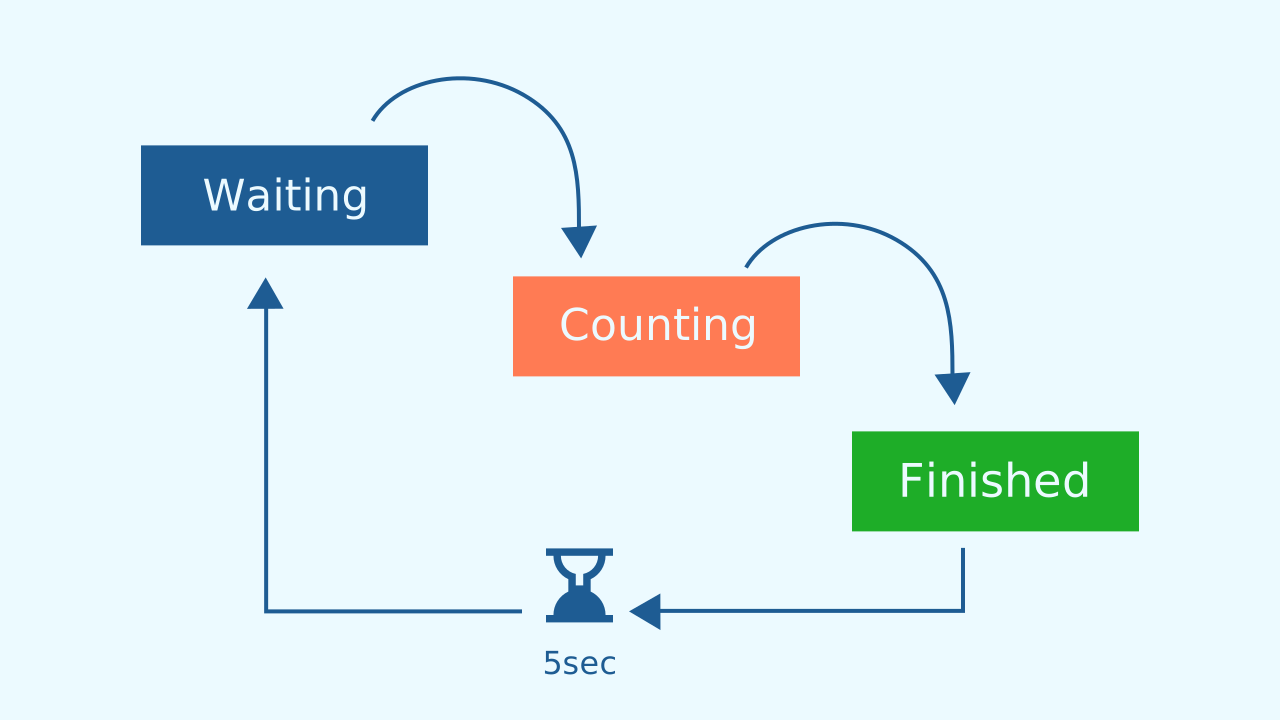
State Machines: The "Modes" of a Program
Almost every complex program can be described as a state machine. That means the program can be in different "modes" or "states", and there are clear rules for moving from one state to another. Our screamometer has three main states:
- Waiting State: The game is ready to start, it just needs the starting signal. The
gameInProgressvariable is false. - Counting State: The LED bar keeps advancing. The
gameInProgressvariable is true. - Finished State (Cooldown): The game is over and shows the result with music for 5 seconds. During that time,
gameInProgressstays true, so no new round can be started. After those 5 seconds,gameInProgressgoes back to false and the game is ready to start again. Watch out: a scream let out during this cooldown is lost without warning — you have to wait for the screen to go dark and scream again.
The Synergy of Events and Loops
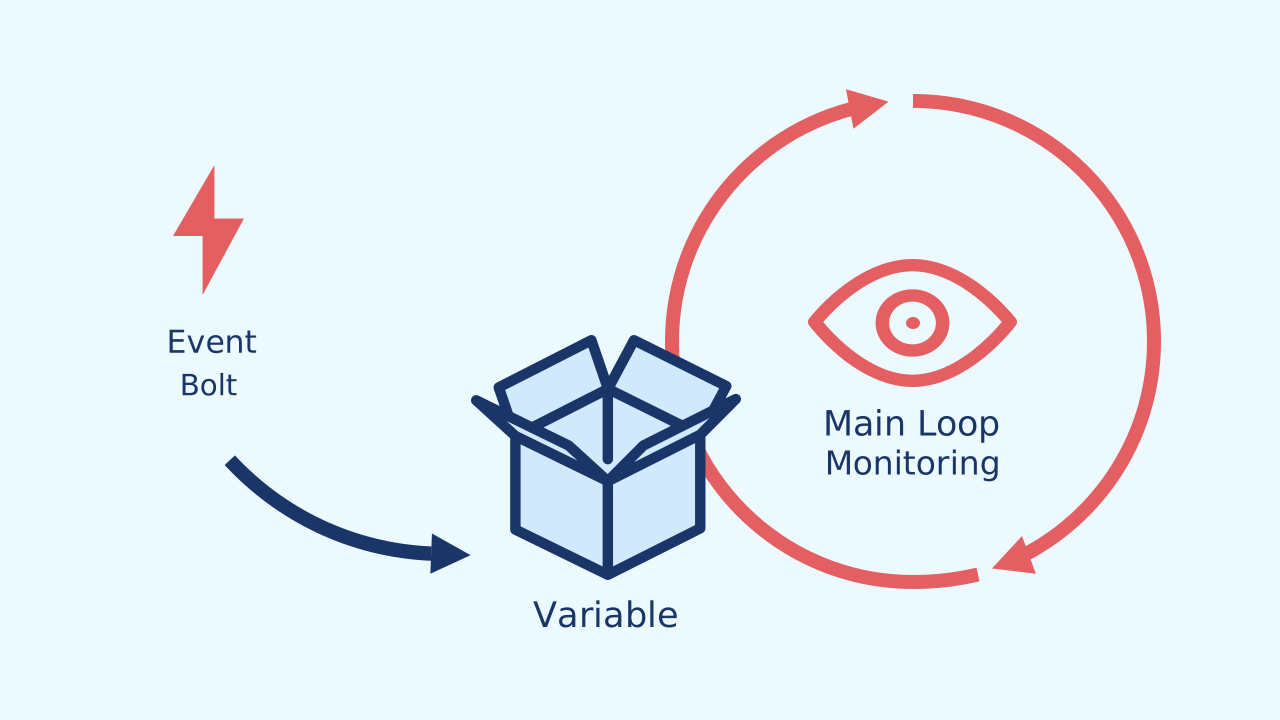
In complex projects, you often don't use only an event or only a loop. You use a clever combination of the two, letting each one do what it does best:
- Events: Perfect for starting actions or switching states instantly. In our case, a loud noise event is the starting gun that kicks off the round.
- Loops: Perfect for managing ongoing processes that depend on a state. Our main loop doesn't start the game. When gameInProgress is true, it keeps the game running for as long as the noise level is greater than or equal to 5. When the noise drops below that value, the loop ends and the program moves on to the final stage of the round.
The Logic of Our Battle
Our design combines everything we've learned:
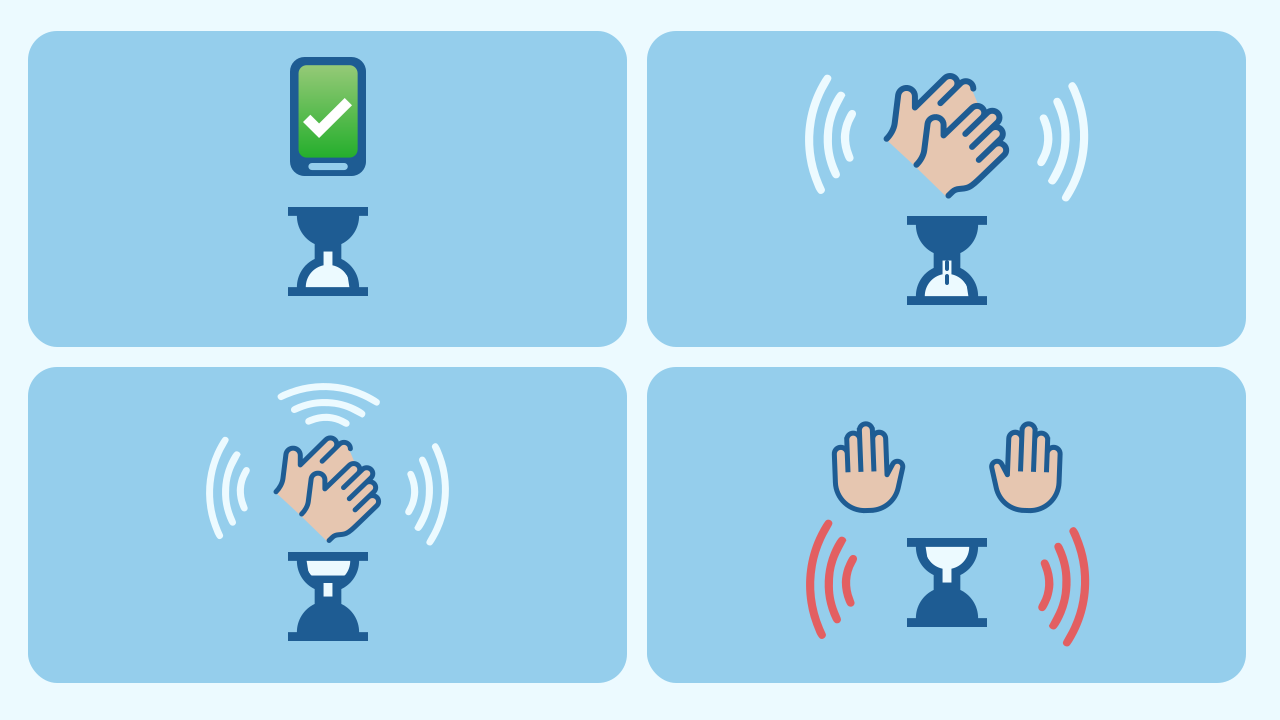
- We use a boolean variable,
gameInProgress, to control whether a new round can start (it handles the Waiting and Cooldown states). - We check whether the game has started and, for as long as the noise level is greater than or equal to 5, the bar keeps advancing by one LED every half second (this handles the Counting state, which lights up the LED screen).
- A loud noise event starts the game by switching
gameInProgresson. The event always fires; it's the main loop that only listens to it when we are in the Waiting state. - The main loop takes care of the rest: it updates the screen while we're Counting and, when the noise stops, moves to the Finished state.
Create
Let the Scream Battle begin!
Build the cardboard model— you will also need a couple of rubber bands to hold the phone against the cardboard
- We'll need 3 components: NoiseLevel to listen to the screams, LEDDraw to show how long the scream lasts using the LEDs, and AudioPlayer to give us feedback every time the time goes up and when the round is over.
- Make sure you have them ready in your workspace. You can open them in the same window.
We're ready for the final challenge!
Code Composition
Look at how the event and the loop work as a team. The event block has a single mission: if it detects a sudden jump in noise, it starts the game by switching gameInProgress on.
The main loop handles everything else: if gameInProgress is on (the game is running), the column and row variables are set to the first position of the LED screen; then, for as long as the noise level is greater than or equal to 5, the program travels across the LED screen row by row and column by column. Inside this repeat while loop, the LED screen lights up bit by bit based on the row and column variables, then a sound plays to show you're making progress, the program waits half a second and carries on: this is where the column variable moves forward to light up the next LEDs, since 1 is added to its value. The advance works like writing in a notebook: add 1 to the column; if you've gone past the edge, go back to the first column and down one row; and if you've gone past the last row, go back to the top — once the screen is full, the screamometer repaints over what's already lit and you no longer see any change even if the scream goes on.
When the noise level drops below 5, it means you've stopped screaming, so the round is over. To show this, a final sound plays and the program waits 5 seconds, and finally sets gameInProgress back to false so you can play again.
Reflect
This program manages several "states". Can you name the different states and the variables that control them?
Describe what the event is for and what the main loop is for. Why do you need both for this game to work properly?
If you wanted to make the game harder (so you have to scream longer for the LEDs to light up), which value in the code would you change?