
The Magic Tilting Xylophone
Have you ever dreamed of making music just by moving your hands? In this mission, we'll make that dream come true. We'll put buttons and keys aside and give our program "senses" so it can perceive the real world. You'll learn how to use your device's motion sensor to build a magic xylophone, where every tilt becomes a different musical note. Get ready to conduct your very own symphony of movement!

Level Basic
What will we do?
Are you a teacher?
Courses
- Grades 3-12
Materials
- Cell phone and computer
- Internet connection
- Cardboard, scissors and a couple of rubber bands to hold the phone against the cardboard
Description
In this activity, students will learn to use the phone's tilt sensor (the accelerometer) to control the notes of a virtual keyboard in real time, creating an intuitive, direct connection between a physical input and a digital output.
Educational Objectives
- Understand the concept of "mapping data" from a sensor to an output.
- Use the device's accelerometer as a source of input data.
- Build an interactive musical prototype that responds to physical movement.
- Identify how gestures can control technology.
Start (10 minutes) - Giving Our Programs Senses
- Welcome the class and introduce the project: "Today we are going to stop giving our programs orders and start teaching them how to feel. We'll build a musical instrument that you play by moving!"
- Start the conversation: "Besides the screen, in what other ways can a phone know what is going on around it?" Guide them toward the idea of sensors (camera, microphone, etc.).
- Introduce the key concept: "We are going to use a sensor that feels movement. But how do we turn a plain tilt number into a musical note? Let's find out!"
How Do Programs 'Feel'?
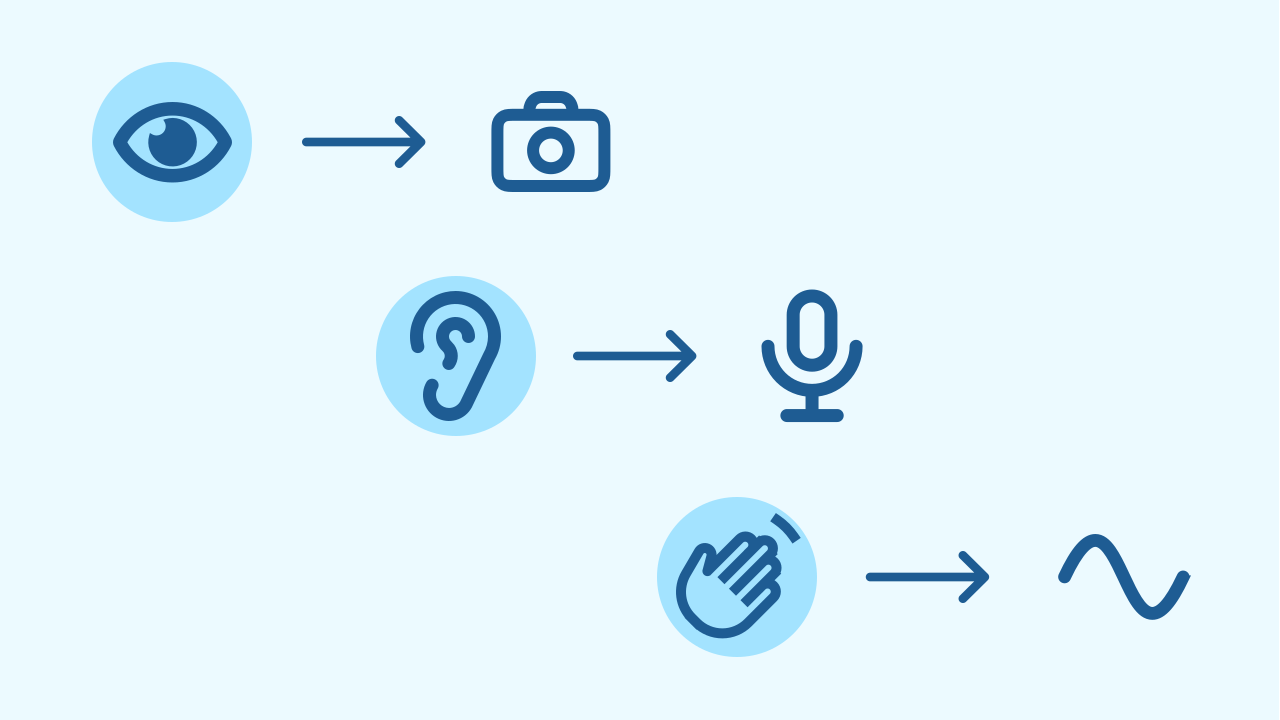
Just as we have senses (sight, hearing, touch) to understand the world, electronic devices have sensors. A camera is like an eye, a microphone is like an ear, and to feel movement they use an accelerometer! These sensors give the program information about the physical world around it.
The Accelerometer: A Sense of Balance
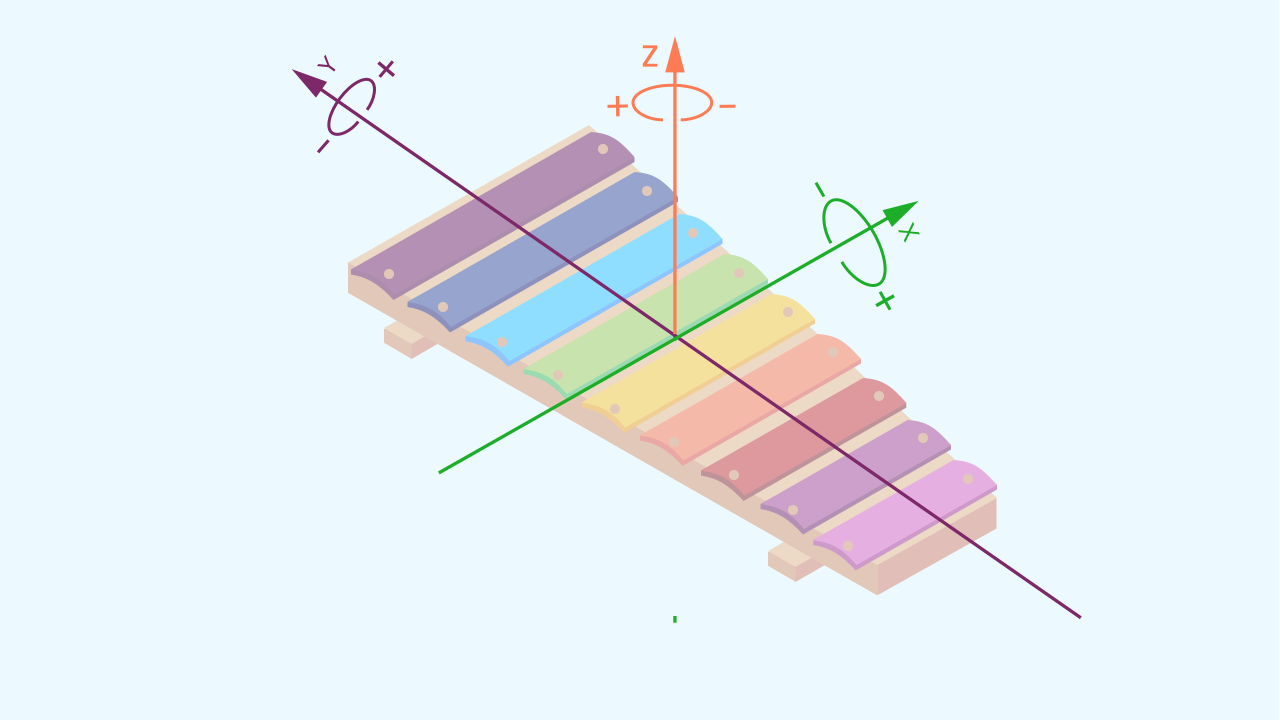
The accelerometer is a tiny sensor inside your phone that measures acceleration and feels the force of gravity. Thanks to it, the phone knows whether you are tilting it forward, backward, left, or right. It measures this tilt on three axes: X (left-right), Y (forward-backward), and Z (up-down). For our xylophone, we'll use the Y axis to control the notes!
What Is Direct Mapping?
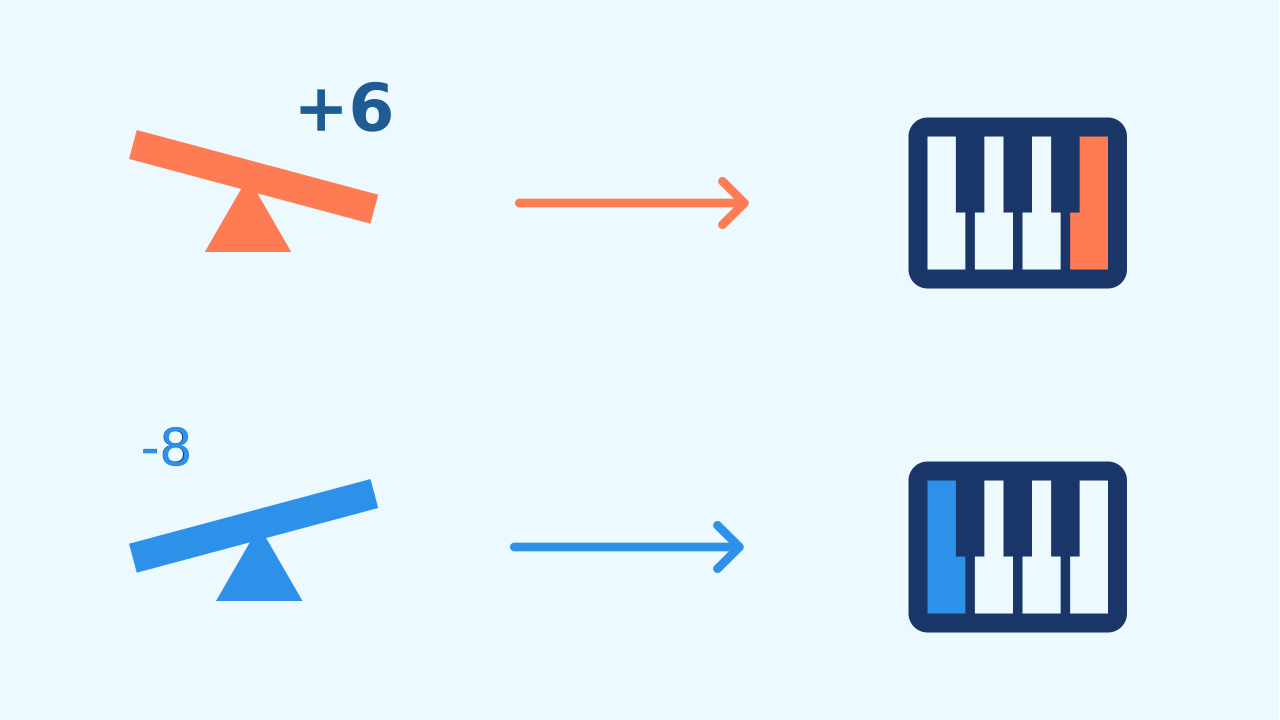
Direct Mapping sounds complicated, but it's like an instant translation! It means taking the number a sensor gives us and using it directly to control an output. In our case:
- The Input is the number for the phone's tilt.
- The Output is the musical note we hear. Tilt it a little and you get one note. Tilt it a lot and you get another. The movement is "mapped" straight onto the sound!
Development (20-30 minutes) - Building the Magic Instrument
- Now that they understand the idea of "mapping" a sensor's data, it's time to build the xylophone.
- Guide the students through the step-by-step instructions for connecting the components and writing the code, as detailed below. Encourage them to experiment by tilting the device slowly and then quickly, so they can "feel" the mapping in action.
Closing (5-10 minutes) - Reflection on sensors and their data
- Once everyone is making music with their devices, it's time to consolidate what they have learned.
- Ask the class: "What exactly is happening in the code? How does the sensor's number get 'translated' into a specific note?" Use the questions in the reflect section to explore other uses for mapping sensor data.
Reflect
You have just created a musical instrument with no keys. What is the relationship between the data in this project?
The code uses the Y axis (forward/backward tilt). What do you think would happen if you changed it to read the X axis (left/right tilt) instead?
Besides musical notes, what else could you control with the tilt sensor? The loudness of the sound? Lighting up a specific number of LEDs? The type of sound?
How Do Programs 'Feel'?
Just as we have senses (sight, hearing, touch) to understand the world, electronic devices have sensors. A camera is like an eye, a microphone is like an ear, and to feel movement they use an accelerometer! These sensors give the program information about the physical world around it.
The Accelerometer: A Sense of Balance
The accelerometer is a tiny sensor inside your phone that measures acceleration and feels the force of gravity. Thanks to it, the phone knows whether you are tilting it forward, backward, left, or right. It measures this tilt on three axes: X (left-right), Y (forward-backward), and Z (up-down). For our xylophone, we'll use the Y axis to control the notes!
What Is Direct Mapping?
Direct Mapping sounds complicated, but it's like an instant translation! It means taking the number a sensor gives us and using it directly to control an output. In our case:
- The Input is the number for the phone's tilt.
- The Output is the musical note we hear. Tilt it a little and you get one note. Tilt it a lot and you get another. The movement is "mapped" straight onto the sound!
Create
Let's build our magic xylophone.
Build the cardboard model— you will also need a couple of rubber bands to hold the phone against the cardboard
- Press ✙ Add device and select MusicalKeyboard to produce the sound.
- Press ✙ Add device again and select Inclination to read the device's movement.
- Remember to scan both ▣ QR codes with the same phone, or to open them in the same window.
Now we are ready to compose music with movement.
Code Composition
Click on the question mark to open the comments that explain the code. The program is very simple: inside a repeat forever loop, we read the tilt value on the Y axis. Then we take that number, add it to a base note (60, which is middle C) and play the result. That shift also does a second job: the musical keyboard only accepts positive numbers and the tilt can be negative — adding 60 makes sure the note always exists. That way, every tilt angle produces a different note!
Reflect
You have just created a musical instrument with no keys. What is the relationship between the data in this project?
The code uses the Y axis (forward/backward tilt). What do you think would happen if you changed it to read the X axis (left/right tilt) instead?
Besides musical notes, what else could you control with the tilt sensor? The loudness of the sound? Lighting up a specific number of LEDs? The type of sound?